iOS only. Asha runs on iPhone.

Want to test Asha?

Important: use the email tied to your iPhone's Apple ID. TestFlight is matched to that exact address; a different email won't get the invite.
Already got a TestFlight invite? Scroll down to the install guide.
Beta tester guide

Welcome to the Asha beta.

Already invited? This guide walks you through getting set up (about five minutes) and how to send useful feedback once you're in. If anything is unclear, reply to the email that brought you here.

What is Asha? Asha is an AI-powered second-opinion tool. After a short voice intake with our AI physician persona Ralph, an AI panel of twelve specialty agents reviews your case and tells you whether you should seek a second opinion from another doctor. Asha does not diagnose, prescribe, or replace your treating physician. The whole product is in beta. Expect rough edges.
Two emails, in this order. First, an App Store Connect team invite from Apple. This lets you become an internal tester. Once you accept it, we add you to the test group, and Apple sends a second email. The actual TestFlight invite. Don't skip the first one.
1

Accept the App Store Connect team invite

Open the email from no_reply@email.apple.com with the subject "You've been invited to join App Store Connect". Tap the Accept Invitation button. You'll be sent to a sign-in page on Apple's site.

App Store Connect invitation email in Apple Mail showing 'You've been invited to join App Store Connect' and an Accept Invitation button.
Look for the email from no_reply@email.apple.com. Open on the iPhone you'll test on so the next steps stay on the same device.

Sign in with the Apple ID that matches the email address you gave us. If you don't have an Apple ID for that email, create one. It has to be on the same email we invited. Apple may ask for a phone number for two-factor authentication; that's normal.

Apple Account sign-in page with Apple logo and an Email or Phone Number field.
Apple's sign-in page. Apple may show a 2FA prompt on a trusted device.

Once accepted, you're a member of the Asha team in App Store Connect. We'll see you appear, and we'll add you to the internal test group. Then you get email #2.

The role we've granted is Customer Support, Asha-only. The minimum role Apple permits for internal beta testing. You won't see other apps; you can't ship code or change any settings.
2

Install the TestFlight app

If you don't already have it, install TestFlight from the App Store. It's free and made by Apple. It's the official way to try pre-release iOS apps.

Open TestFlight in the App Store

Apple's TestFlight page showing the white paper-airplane icon on a blue gradient and the heading 'Testing Apps with TestFlight'.
That's the official TestFlight icon. White paper airplane on a blue gradient. The App Store listing for TestFlight shows the same icon.
3

Accept the Asha TestFlight invite

Once we've added you to the internal test group, you'll get a second email from Apple. Subject something like "You've been invited to test Asha". Open it on your iPhone and tap View in TestFlight.

TestFlight invitation email in Apple Mail with the TestFlight icon, 'You're invited to test Asha' headline, View in TestFlight button, and a redemption code below.
The second email. From no_reply@email.apple.com with the TestFlight icon. This is what gets you the build.

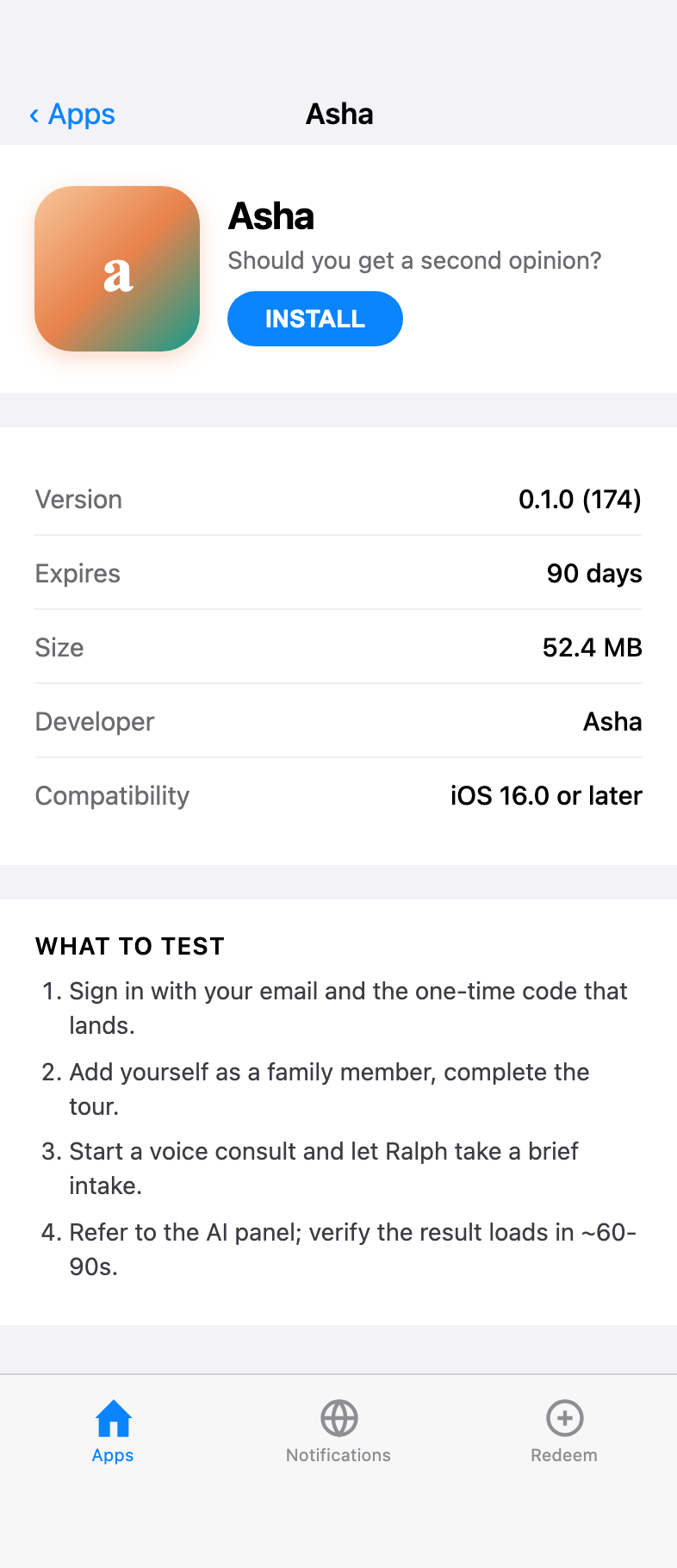
TestFlight will open with an Asha listing. Tap Accept, then Install. The first install takes about 30 seconds.

TestFlight app showing the Asha listing with saffron-and-teal app icon, 'Should you get a second opinion?' subtitle, Install button, version 0.1.0 (174), and a What to Test section.
Build numbers update frequently in beta. The highest one is what you want.
New builds during beta: when we ship a new version, TestFlight notifies you. Just open TestFlight and tap Update. Beta builds expire after 90 days. TestFlight will tell you if a build is stale.
4

Install Asha and complete first-run setup

Tap Open from TestFlight (or find Asha on your home screen). The first time you launch Asha:

  1. You'll see a brief welcome and a privacy notice. Read it; then accept it to continue.
  2. You'll be asked for your email and a one-time passcode (OTP). The OTP comes by email; enter it to sign in.
  3. You'll be asked to add yourself to your own family list (so consults can be about you).
  4. You'll be offered a quick tour of the dashboard. Take it the first time.
Asha first-launch welcome screen reading 'An entire hospital, at your fingertips' with a Get Started button. Asha privacy screen titled 'What Asha sees, and what it doesn't' with toggles for sharing health-app data and storing on device.
First two screens you see. Welcome (left), then the privacy disclosure (right). Privacy notice has to be read before continuing.
Asha sign-in screen reading 'One email. No password.' with email and optional name fields.
The sign-in screen. Enter your email, tap Send code. The OTP entry screen appears next; it's a single 6-digit code field. If the code doesn't arrive in 30 seconds, check spam.
5

Run your first consult

From the dashboard, tap Start a consult. Pick yourself (or a family member you've added). You'll be taken to a screen where you choose either voice or text intake.

Voice intake shows a video avatar. That's Ralph. He'll ask you about the situation. Speak naturally. Pause when you're done; Ralph will respond.

Text intake is the same flow, just typed. Use it on a noisy bus or if voice isn't working.

Asha voice consult screen with Ralph's circular avatar in saffron tones, a 'Ralph is listening' indicator, a transcript of the conversation, and a microphone button at the bottom.
Ralph won't diagnose. He's gathering enough information for the panel to review.

Once Ralph thinks he has enough, he'll offer a recap and an option to refer to the AI panel. Tap it. The panel takes about 60-90 seconds to think.

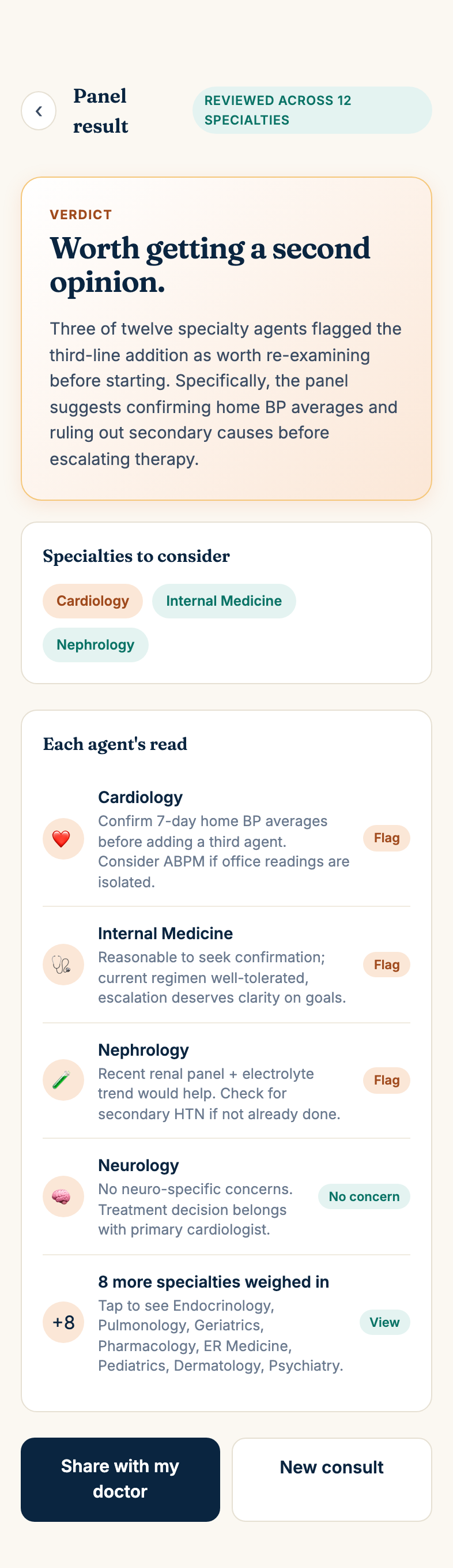
The result screen shows whether the panel thinks you should get a second opinion, what specialties to consider, and the reasoning behind it. Read it carefully. And remember Asha is a tool to help you decide, not a substitute for your doctor.

Asha panel result screen showing the verdict 'Worth getting a second opinion', a Specialties to consider section with chips for Cardiology, Internal Medicine, and Nephrology, and each agent's reasoning with Flag/No-concern dispositions.
The panel's verdict is one of: seek a second opinion, follow up with current doctor, or no clear concern. Each of the twelve specialty agents posts its read; tap to expand the rest.
Use a real situation if you can. The product is designed for real clinical context. Feedback we get from someone using it for an actual concern is much more useful than feedback from a "let me see what happens" test. Make-up cases are fine too; just tell us.
6

Send feedback the right way

There are three places to send feedback. Use the one that fits the situation.

1. TestFlight feedback (preferred for crashes + UI bugs)

In TestFlight, take a screenshot of what you're seeing and TestFlight will offer to attach it to a feedback message. Or open TestFlight, find Asha, scroll down, and tap Send Beta Feedback. This goes straight to us with device + iOS version metadata attached.

TestFlight 'Send Beta Feedback' composer with the Asha app meta-info, a feedback text field, and an auto-attached screenshot.
Attach a screenshot if it's visual; describe the steps if it's behavioral.

2. In-app diagnostic (preferred for "Ralph wasn't quite right")

Open Asha → Settings → Send diagnostic to dev. This sends an audit log of the last consult. What Ralph asked, what the panel returned. So we can debug without needing you to remember the exact wording.

Pair this with a one-line note about what felt off.

3. Email (for everything else)

Reply to the welcome email or write to beta@withasha.com with whatever's on your mind. Long-form thoughts on the experience are very welcome.

What kind of feedback is most useful? Specifics. "Ralph asked me the same question twice on build 174 after I said my meds" is more useful than "Ralph repeats himself sometimes." If you can include a build number (visible at the bottom of the dashboard), even better.
?

Troubleshooting

I never got the first email from Apple

Check spam. The sender is no_reply@email.apple.com. The invite expires in three days. If it's been longer, email beta@withasha.com and we'll resend.

I accepted the team invite but never got the TestFlight invite

That second email comes after we manually add you to the internal test group. It can take a day. If it's been longer than that, email beta@withasha.com.

Asha freezes on the avatar / Ralph stays silent

This is a known set of bugs we're hunting. Take a screenshot, then go to Settings → Send diagnostic to dev. Include the build number from the dashboard footer. Force-quit and reopen. Usually clears it.

I can't get the OTP email to arrive

Check spam. Wait 30 seconds. Try again. If it still doesn't come, email beta@withasha.com. Our email delivery service occasionally rate-limits new addresses.

The voice mode mishears me

The on-device speech recognition is decent but not perfect. If a turn went off-rails, switch to text mode for that consult. There's a toggle on the consult screen. We're working on speech-quality fixes.

!

What we ask of you

Asha is in private beta and what you see here is confidential. By installing the app, accepting the TestFlight invite, or otherwise using Asha during the beta, you agree to the following obligations. These obligations also appear in our Terms of Service §5 (Beta tester obligations) and apply in addition to the general Terms.

Confidential information

"Confidential information" means anything non-public you observe, receive, or generate while testing Asha. Including but not limited to: the app and its user interface, screenshots and screen recordings, build numbers, the wording and behavior of the AI persona Ralph, the AI panel's verdicts and reasoning, defects and bugs you discover, internal release notes, our roadmap, and any business or technical information Asha shares with you privately.

It does not include information that is publicly available without your involvement, that you knew before joining the beta, or that you receive from a third party who is not bound by confidentiality to us.

Your obligations

Term

Your confidentiality obligations begin when you first use the beta and continue until either Asha is generally available to the public, or two years from your first use, whichever is sooner. Obligations relating to information you know to be sensitive (security flaws, internal data) survive indefinitely.

No warranties, no liability for clinical decisions

Beta software is provided as-is. Ralph and the panel may say things that are wrong, incomplete, or misleading. That's exactly what we're testing for. Don't rely on Asha during beta to make a medical decision without independently consulting your physician. We're not liable for any decision you or anyone else makes on the basis of beta output. Asha never diagnoses, prescribes, or treats; it offers guidance about whether to seek a second opinion.

No license, no transfer of rights

You're getting limited, revocable, non-transferable use of the beta. You're not getting any rights to Asha's intellectual property, the prompts that drive Ralph and the panel, the AI personas, the brand, or any underlying technology.

A separate, signed beta agreement may follow before public launch. Until then, these obligations are binding by virtue of your continued use of the beta.